DM50 Calculator is a scientific calculator app that brings the power of a high-precision programmable calculator to your device. Inspired by classic HP calculators, it features a retro monochrome LCD display and ten specialized calculation modes.
Coming soon to the App Store, Mac App Store, Google Play and Windows Store.
Getting started
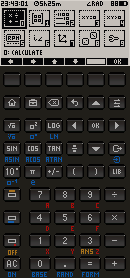
When you open the app you land on the main menu, which shows 10 modes as icons on the LCD screen. Tap or click any icon to enter that mode, or press the corresponding digit key (0–9) on your keyboard.

To go back to the main menu from any mode, press 9 or the HOME button. To go back one step, press ESC.
Modes
0 · CAS — Algebraic calculator
Type any mathematical expression and press Enter to evaluate it. The evaluator respects standard operator precedence (* and / before + and -), parentheses, and powers.
| Key | Symbol |
|---|---|
[ | ( left parenthesis |
] | ) right parenthesis |
^ (F5) | power |
Examples:
2+3*4→14(2+3)*4→202^10→1024
Use F6 / CLR to clear the input.
1 · Matrices
Operates on two 2×2 matrices A and B. Navigate between the 8 cells with the arrow keys. Type a value and press Enter to store it in the active cell.
| Button | Operation |
|---|---|
| F1 | Det(A) — determinant |
| F2 | Inv(A) — inverse |
| F3 | A + B |
| F4 | A × B |
| F5 | Tr(A) — trace |
| F6 | CLR — clear all |
2 · Base conversion
Converts integers (16-bit unsigned) between decimal, binary, octal and hexadecimal simultaneously. Select the input base with F1–F4, type the number and press Enter. All four representations update at once.
| Button | Base |
|---|---|
| F1 | DEC — decimal |
| F2 | BIN — binary |
| F3 | OCT — octal |
| F4 | HEX — hexadecimal |
3 · Equations
Solves linear and quadratic equations numerically, including complex roots.
- F1 · Linear — solves
ax + b = 0. Enter coefficients a and b, press Enter or F5. - F2 · Quadratic — solves
ax² + bx + c = 0. Enter a, b and c, press Enter or F5. Complex roots are shown asa ± bi.
Use the arrow keys to move between coefficient fields.
4 · Inequalities
Solves linear inequalities of the form ax + b > 0 (or <, ≥, ≤). Select the operator with F1–F4, enter a and b, then press F5 to obtain the solution set.
| Button | Operator |
|---|---|
| F1 | > |
| F2 | < |
| F3 | ≥ |
| F4 | ≤ |
5 · RPN
Classic HP-style RPN calculator with a 4-level stack (T, Z, Y, X).
- Type a number with the digit keys.
- Press Enter or F1 to push it onto the stack (Enter on an empty input duplicates X).
- Operators F3–F6 consume X and Y and push the result.
- F2 / Backspace deletes the last digit or clears X to zero.
| Button | Action |
|---|---|
| F1 | ENTER — push |
| F2 | DEL — delete / clear X |
| F3 | + |
| F4 | − |
| F5 | × |
| F6 | ÷ |
6 · Complex numbers
Performs arithmetic on two complex numbers A (a₁ + b₁i) and B (a₂ + b₂i). Navigate between the four fields (real and imaginary parts of A and B) with the arrow keys.
| Button | Operation |
|---|---|
| F1 | A + B |
| F2 | A − B |
| F3 | A × B |
| F4 | A ÷ B |
| F5 | |A| — modulus of A |
| F6 | CLR |
7 · Vectors
3D vector calculations on vectors A (x₁, y₁, z₁) and B (x₂, y₂, z₂). Navigate between the six component fields with the arrow keys.
| Button | Operation |
|---|---|
| F1 | A + B — sum |
| F2 | A − B — subtraction |
| F3 | A · B — dot product |
| F4 | A × B — cross product |
| F5 | |A| — modulus of A |
| F6 | CLR |
8 · Statistics
Analyses a data set of up to 20 values. Enter a number and press Enter or F1 to add it. Press F3 at any time to compute the statistics.
| Button | Action |
|---|---|
| F1 | ADD — add value |
| F2 | DEL — remove last value |
| F3 | STAT — compute results |
| F6 | CLR — clear all data |
Results shown: mean, sample standard deviation, minimum, maximum, sum.
9 · Settings
Navigate options with the ↑ ↓ arrow keys. Press Enter to cycle through the available values for each setting. Press F6 / OK to confirm.
| Setting | Options |
|---|---|
| Angle Measure | Radians · Degrees |
| Coord System | Rectangular · Polar |
| Number Format | Scientific · Fixed · Engineering |
| Precision | Binary128 (quad) · Binary64 (double) |
| LCD refresh | 50 ms · 100 ms · 200 ms |
| Sound / Haptic | Sound ON · Sound OFF · Haptic ON · Haptic OFF |
Character input
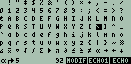
Some modes allow text entry. The on-screen keyboard cycles through character sets using the function buttons.
General controls
| Key | Action |
|---|---|
ESC | Go back one step |
9 or HOME | Return to main menu |
↑ ↓ ← → | Navigate fields and menus |
Enter | Confirm / evaluate |
Backspace | Delete last character |
F1 – F6 | Context-sensitive function buttons |